Top 10 Automation Connectors for Streamlining Your Workflow?
Automation Connectors are essential tools for modern businesses. They simplify processes by linking various applications. A recent report by Gartner highlights that nearly 70% of organizations plan to increase their automation efforts this year. This trend reflects a growing reliance on automation solutions to improve efficiency and productivity.
Incorporating Automation Connectors can significantly enhance workflow. According to Forrester, companies that use automation tools report a 20% increase in overall performance. However, while these connectors streamline functions, they can also introduce complexity. Many businesses struggle to choose the right connectors for their unique needs.
Despite the benefits, relying too heavily on automation presents challenges. Organizations must ensure their staff is trained to leverage these tools effectively. As more businesses embrace automation, the importance of selecting the right Automation Connector cannot be overstated. Proper integration is crucial for success in this evolving landscape.

Understanding Automation Connectors and Their Importance
Automation connectors are vital for optimizing workflows in today's fast-paced business environment. They bridge the gap between various applications, enabling seamless data exchange. According to recent studies, organizations that effectively implement automation can improve their productivity by up to 30%. This efficiency not only saves time but also reduces human errors that can occur during manual data entry.
Despite these advantages, many companies still struggle to integrate automation connectors effectively. A survey showed that 70% of businesses face challenges with connector setup and maintenance. This can lead to inefficiencies and missed opportunities. Moreover, while automation is intended to streamline processes, poorly configured connectors might create additional bottlenecks. Finding the right balance in automation is essential.
Understanding the importance of automation connectors is crucial. They enhance collaboration across departments and improve data accuracy. However, companies must continuously assess their automation strategies. Unrefined approaches or outdated connectors can hinder growth. Emphasizing regular updates and training ensures that teams can leverage these tools to their full potential.
Top 10 Automation Connectors for Streamlining Your Workflow
| Connector Name |
Type |
Primary Use Case |
Integration Level |
Ease of Use |
| Zapier |
No-Code |
Task Automation |
High |
Very Easy |
| Integromat |
No-Code |
Workflow Automation |
High |
Easy |
| Microsoft Power Automate |
No-Code |
Business Process Automation |
High |
Moderate |
| IFTTT |
No-Code |
Personal Automation |
Medium |
Very Easy |
| Automate.io |
No-Code |
Data Sync |
High |
Easy |
| Tray.io |
Low-Code |
Complex Automation |
Very High |
Moderate |
| Pipedream |
Low-Code |
API Integration |
Very High |
Advanced |
| Airtable Automations |
No-Code |
Database Management |
Medium |
Easy |
| Workato |
Low-Code |
Enterprise Automation |
Very High |
Moderate |
| Nintex |
Low-Code |
Process Automation |
High |
Advanced |
Criteria for Selecting the Right Automation Connectors
Selecting the right automation connectors is crucial for enhancing workflow efficiency. Start by assessing compatibility. An ideal connector should seamlessly integrate with your existing tools. Check how well the connector handles data transfer. Look for customizable features that fit your specific needs.
Next, consider usability. A user-friendly interface is vital. Complex setups can lead to frustration and slow adoption. Also, think about scalability. As your team grows, the connectors must adapt. The ability to expand without overhauling the system is a significant advantage.
Finally, evaluate the support options. Effective customer service can make a difference when issues arise. Relying on poor support can lead to wasted time. Consider reading user reviews to gauge reliability. Misalignment in expectations may require revisiting your choices. Balancing these factors can lead to a more streamlined workflow.
Top Automation Connectors for Popular Applications
In today’s digital world, automation connectors play a vital role in enhancing workflows across various applications. They help integrate different tools and platforms, saving time and effort. With the right connectors, businesses can streamline repetitive tasks and focus on strategic initiatives that drive growth.
Tips: Choose connectors that are user-friendly. A complex setup can lead to frustration. Make sure to test different options to find the best fit for your needs.
Consider connectors that support popular tools like project management software, CRM systems, and communication platforms. Successful integration can enhance collaboration. However, be cautious; some connectors might require extensive customization. Avoid assumptions about ease of use. Reflect on your needs and choose accordingly.
Tips: Regularly review your automation workflows. This process helps you identify areas for improvement. Don't hesitate to reach out for support when needed. It’s important to remain adaptable and open to new ideas as technology evolves.
Integrating Automation Connectors into Your Existing Workflow
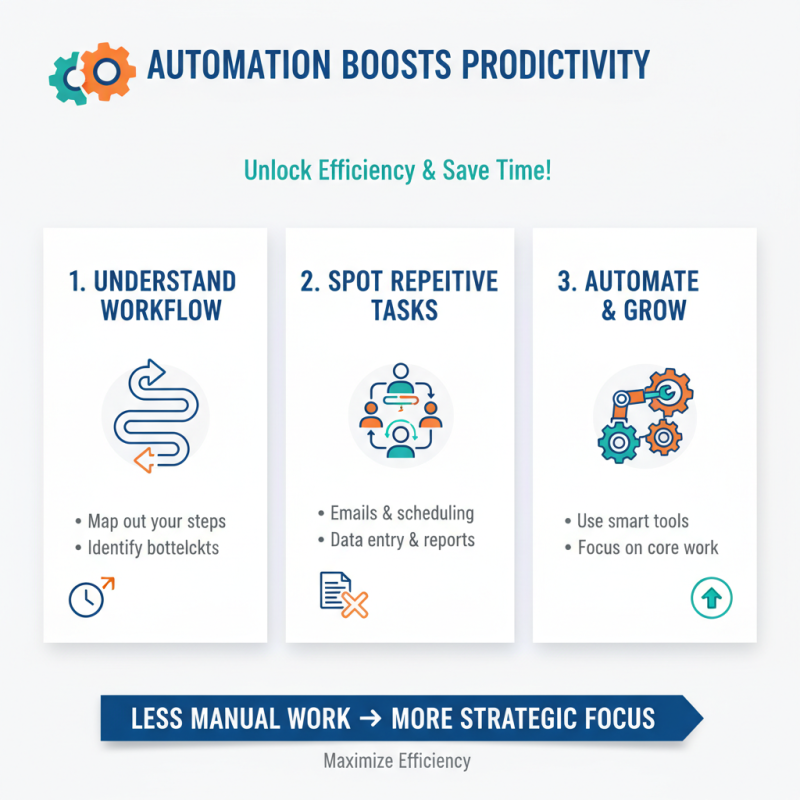
Integrating automation connectors into your workflow can greatly enhance productivity. These tools allow different applications to communicate seamlessly. For example, you can automate data entry from emails to spreadsheets. This saves time and reduces errors.
Tips: Assess your current workflow. Identify repetitive tasks that consume time. Evaluate which connectors can streamline these processes. Sometimes, less popular connectors can meet specific needs effectively.
Using automation can seem overwhelming at first. You may encounter challenges during setup. Don't rush the process; take your time to understand each connector's function. Small errors can lead to significant issues down the line.
Testing your integrations thoroughly is crucial. You want to ensure they work together smoothly. If something doesn’t feel right, pause and reassess. Reflecting on the integration can lead to better outcomes.
Best Practices for Maximizing Efficiency with Automation Tools
Automation tools can significantly enhance productivity. To maximize their efficiency, it's crucial to understand your workflow. Identify repetitive tasks that waste time. Many people overlook small, manual steps that could benefit from automation. These tasks often accumulate, leading to frustration and inefficiencies.
Creating a clear plan before implementing automation is essential. Outline your key processes and desired outcomes. Sometimes, people jump into automation without a structured approach. This can lead to a disjointed system that complicates rather than streamlines work. Regularly review and adjust your automated workflows. This reflection allows for continuous improvement.
Integrating automation connectors means choosing the right tools that align with your needs. Take time to test different options and gather feedback from team members. Often, a solution that seems suitable for one may not work for another. Encourage open discussions about challenges faced with automation. Addressing these can lead to more effective solutions and heightened overall efficiency.

 Email
Email WeChat